Using Smart Cruise#
This tutorial demonstrates how to use smart-cruise to find Pareto-optimal trajectories.
Note on Generality: While this example uses liner-style parameters, the underlying model is completely generic. It applies to any vehicle with state-dependent energy consumption: UAVs, AUVs (underwater vehicles), ground vehicles, ships, etc. See the main documentation for more details on adapting the model to other domains.
SC finds the Pareto front of energy/time optimal trajectories.
Distance, height, and speeds are discrete. Finer granularity leads to better solutions.
Speed is governed by a backoff parameter that tells when the vehicle can adjust speed.
Energy (“weight”) and time budgets are continuous.
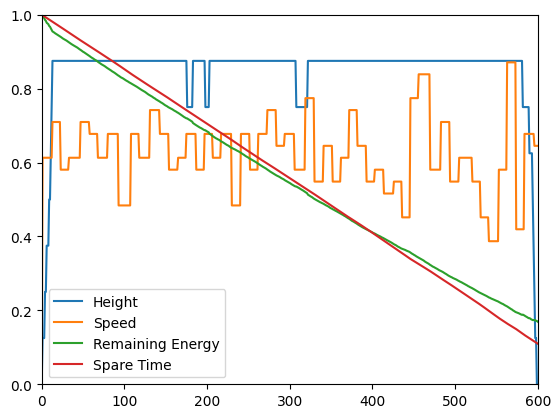
The default cost model is randomized, taking into account position, height, speed, remaining energy, and height change.
For each internal state (distance, height, speed, backoff), a Pareto front is computed. The front is quantized for a trade-off between computation speed and solution quality.
In this tutorial notebook, we will investigate the impact of Pareto quantization on three scenario, then have a look at the best trajectories for the last scenario.
Preparation#
We will use Joblib to parallelize simulations with various quantization on a given scenario.
Note
This tutorial uses joblib for parallelization. You can install it with:
pip install joblib
The following cell chews all the work for us. It computes Pareto-optimal trajectories with various internal front quantizations.
[1]:
from functools import partial

from joblib import Parallel, delayed

from smart_cruise import CostRandom, Cruise

pms = [2**i for i in range(7)][::-1]
n_s = 31


def traj_maker(pm, w0, t0):
    model = CostRandom(seed=42, n_s=n_s)
    cruise = Cruise(model)
    cruise.parameters.pareto_max = pm
    cruise.compute(w0=w0, t0=t0)
    return pm, cruise.trajectories


def pms_trajs(w0, t0):
    return Parallel(n_jobs=-1)(delayed(partial(traj_maker, w0=w0, t0=t0))(pm) for pm in pms)
Tight budget#
Let us start with a tight scenario (low weight and time budget):
[2]:
res = pms_trajs(w0=21800.0, t0=21800.0)
Let’s write a function to display the various results:
[3]:
from matplotlib import pyplot as plt


def show_pareto(res, wmin=0, tmin=0, file=None):
    for pm, traj in res:
        if traj.trajs is None:
            continue
        w, t = traj.get_front()
        plt.plot(w, t, label=f"$S={pm}$")
    plt.xlabel("Remaining energy")
    plt.ylabel("Spare time")
    plt.xlim([wmin, None])
    plt.ylim([tmin, None])
    plt.legend()
    plt.show()
Let’s look at the result!
[4]:
show_pareto(res)
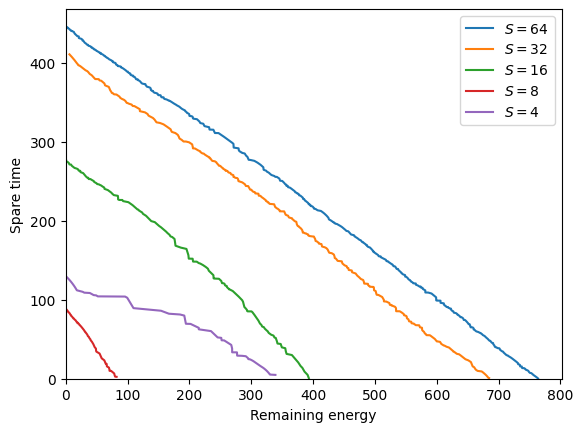
The scenario is so tight that only a few bad decisions make it impossible to find a viable path.
In other words: if the sampling size \(S\) is too low we cannot find solutions.
For intermediate values of \(S\), monotonicity is not guaranteed (there is a chance factor).
Starting from 16, we have solutions. Their quality increases with the number of samples kept.
Bigger budget#
Now look at a scenario with overkill budget:
[5]:
res = pms_trajs(w0=32000.0, t0=32000.0)
Let’s look at the result!
[6]:
show_pareto(res, wmin=4000, tmin=2000)
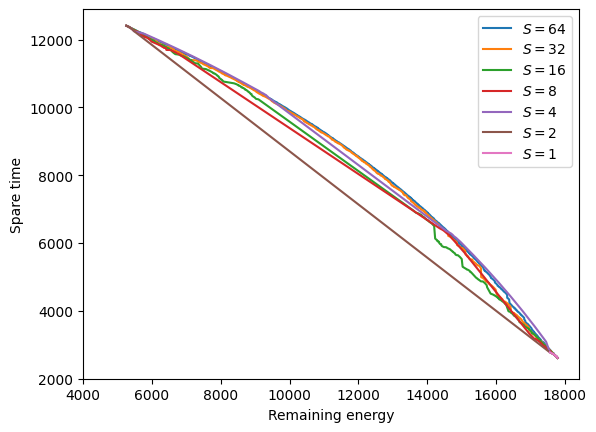
Here all choices lead to a viable path.
Strong quantization (\(S\leq 16\)) finds solutions but with poor quality.
Low quantization seems to converge to the optimal Pareto front.
Note
The tight scenario we just saw can be interpreted as a zoom of the bigger budget on an area that preserves some fixed quantities of the resources. More precisely, if we zoom to keep \(32000-21800 = 10200\), we get the tight budget.
Middle budget#
[7]:
res = pms_trajs(w0=25000.0, t0=25000.0)
Let’s look at the result!
[8]:
show_pareto(res)
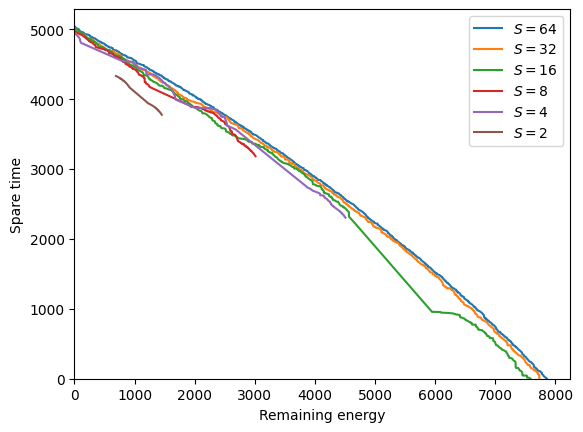
Let’s look at the result!
Trajectories#
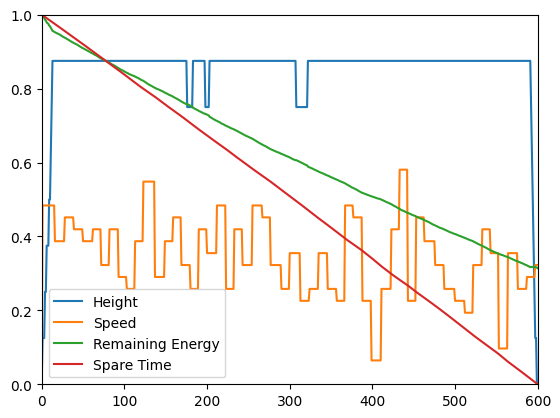
Best weight preserving trajectory:
[9]:
_, trajs = res[0]
trajs.plot_traj(0)
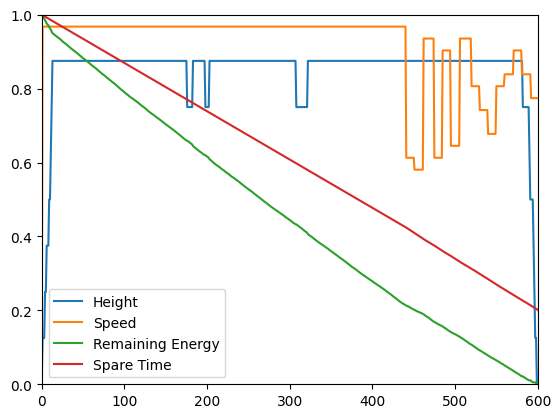
Best time preserving trajectory:
[10]:
trajs.plot_traj(-1)
Balanced trajectory:
[11]:
nt, _ = trajs.trajs.shape
trajs.plot_traj(nt // 2)